The Eagle AXS Transmission pairing process is the same as Eagle AXS Drivetrain and AXS road systems. The derailleur begins and ends the pairing session.
Any time a new component is added, removed, or inadvertently omitted during pairing, the entire pairing process, including all components, must be repeated.
Please refer to the video below:
Or, to see how to pair your Eagle AXS Transmission with an AXS Reverb post, refer to this video:
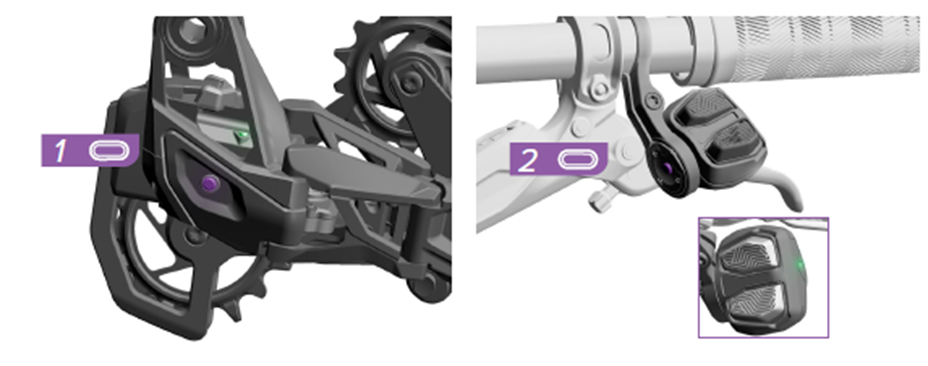
1. Press and hold the AXS button on the derailleur until the AXS LED blinks slowly, then release.
2. Press and hold the AXS button on the controller until the green LED blinks quickly, then release.
3. Press and release the AXS button on the derailleur to end the pairing session or wait 30 seconds for the session to time out. The AXS LED will stop blinking.
NOTE: Pair the right controller first for setups using two AXS controllers. If more than one controller (e.g., Reverb AXS or Left Flight Attendant) is paired with the system, the one paired first will serve as the default right controller and be shown as right in the app.
More information can be found in the AXS Pairing Guide.